

WMS en la nube frente a WMS local: ¿Qué modelo de implementación es el adecuado para su almacén? (2026)
Elegir un WMS no se trata solo de funciones.
También debes decidir dónde se ejecutará el sistema.
Para la mayoría de las empresas, eso significa elegir entre:
y
Sistema de gestión de almacenes (WMS) local
Ambos sistemas admiten recepción, almacenamiento, inventario, preparación de pedidos, envío, escaneo de códigos de barras, operaciones con dispositivos PDA portátiles e integración con sistemas ERP.
La diferencia radica principalmente en cómo se aloja, mantiene, accede y controla el sistema.
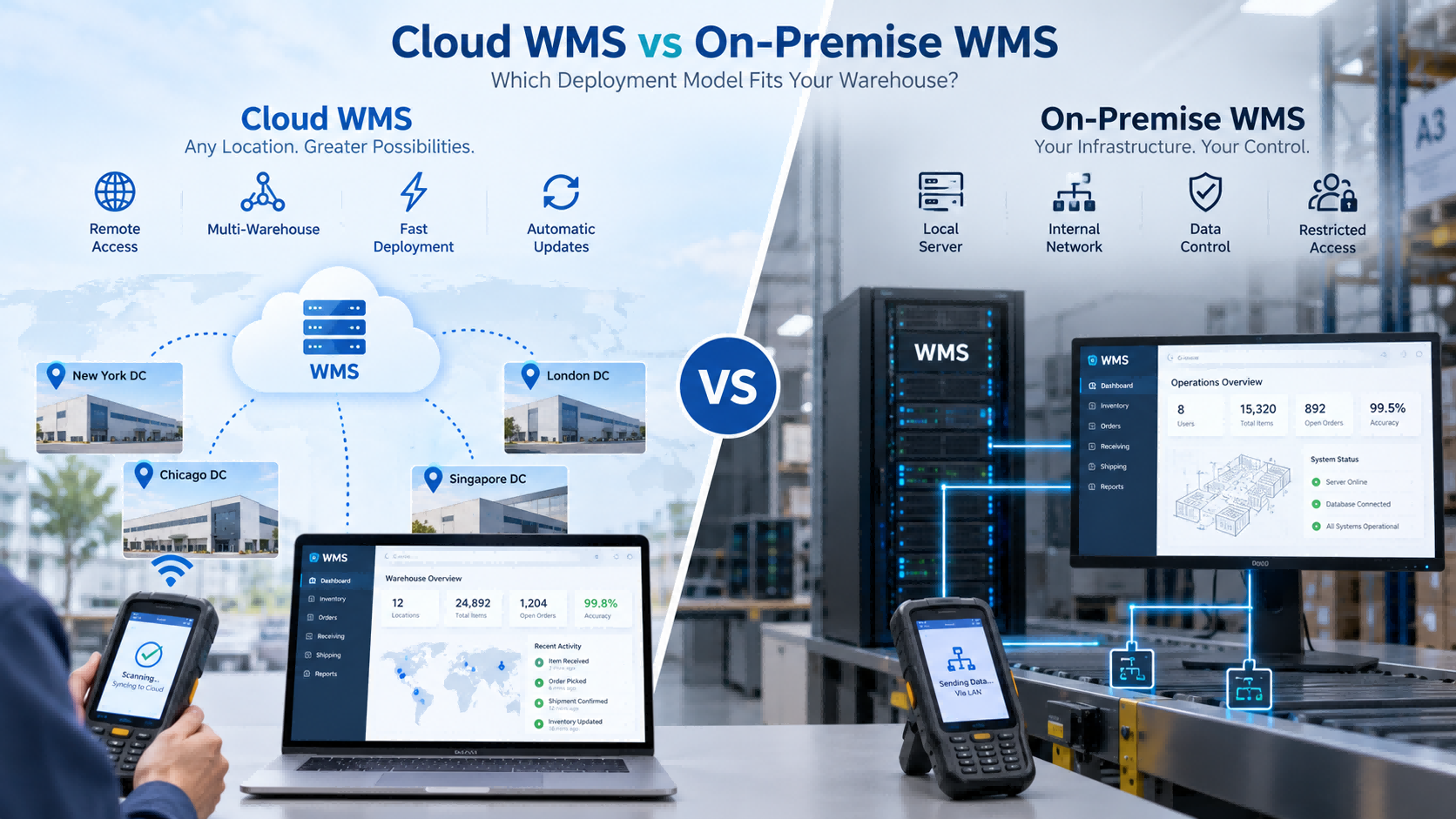
Elija Cloud WMS si desea:
Elija WMS local si necesita:
Para muchos almacenes pequeños y medianos, la nube es una opción más sencilla para empezar.
Pero si su política de TI exige que el sistema permanezca dentro de su propia red, la decisión cambia de inmediato.
Cloud WMS está alojado en una infraestructura en la nube y normalmente se accede a él a través de un navegador o una conexión de red.
Los operadores de almacenes pueden seguir utilizando el mismo hardware:
La diferencia radica en dónde se ejecuta el sistema central.
Una estructura típica es:
PDA → Red → WMS en la nube
Las empresas que desean una implementación más rápida, acceso centralizado y menos mantenimiento de servidores locales suelen optar por la implementación en la nube.
El sistema WMS local se ejecuta dentro del entorno informático del propio cliente.
Una estructura típica es:
PDA → Red interna → Servidor local
Esto suele significar que el cliente es responsable de una mayor parte de la infraestructura, incluyendo:
Este modelo se suele elegir cuando el sistema debe permanecer dentro de una red interna o cuando la política de la empresa limita el acceso externo.
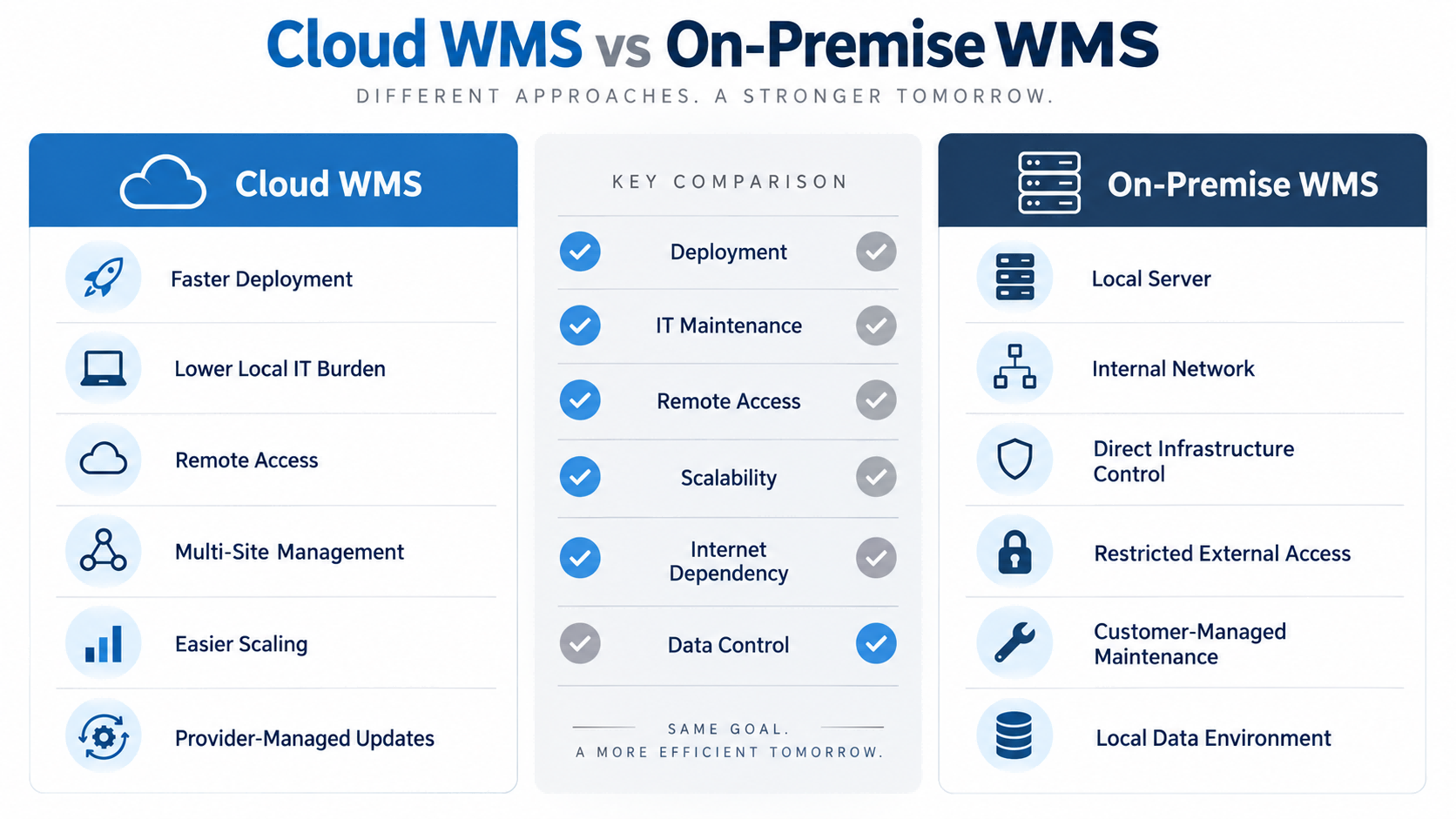
| Factor | WMS en la nube | Sistema de gestión de almacenes (WMS) local | |
| Despliegue | Generalmente más rápido | Más preparación de infraestructura | |
| Servidor local | Normalmente no es necesario | Generalmente requerido | |
| Mantenimiento informático | Menor carga interna | Mayor responsabilidad interna | |
| Acceso a múltiples sitios | Más fácil | Depende del diseño de la red. | |
| Acceso remoto | Más fácil | Requiere configuración | |
| Actualizaciones | Generalmente gestionado por el proveedor | Generalmente gestionado por el cliente. | |
| Entorno de datos | Alojado en la nube | Controlado por el cliente | |
| Solo para red interna | Menos adecuado en algunos casos | A menudo más adecuado | |
| Escalabilidad | Más fácil de expandir | Depende de la infraestructura local. |
Esta tabla ofrece una visión general rápida, pero la decisión final suele depender de su entorno informático.
Los sistemas WMS en la nube suelen reducir la necesidad de crear una infraestructura de servidor local antes del lanzamiento.
Esto puede agilizar la implementación, especialmente para las empresas más pequeñas que no cuentan con un equipo de TI dedicado.
La instalación en las instalaciones del cliente requiere más preparación.
La organización podría necesitar configurar:
El costo también funciona de manera diferente.
Los sistemas WMS en la nube suelen implicar una suscripción de software, usuarios, módulos, implementación y hardware conectado.
La instalación en las instalaciones del cliente puede implicar una mayor inversión inicial en infraestructura y un mantenimiento interno continuo.
La pregunta importante no es simplemente:
¿Cuál es más barato?
Una pregunta mejor sería:
¿Qué modelo generará una menor carga de trabajo y un menor coste total de TI para nuestra empresa en los próximos años?
En un proyecto de almacén de FYJ en Tailandia, el cliente gestionaba alrededor de 500 pedidos al día y aproximadamente 3.000 referencias de productos.
El proyecto utilizó un sistema WMS en la nube junto con impresión y escaneo de códigos de barras, alertas de reabastecimiento, gestión de inventario ABC y de productos de baja rotación, funciones para múltiples almacenes y preparación de pedidos móvil.
Tras la implementación:
Para este tipo de operación, la implementación en la nube tenía sentido porque el almacén necesitaba acceso centralizado, móvil y desde múltiples almacenes sin tener que construir un entorno de servidor local más complejo.
Aquí es donde Cloud WMS suele tener una ventaja práctica.
Si una empresa gestiona varios almacenes, la implementación en la nube facilita que la sede central y las diferentes ubicaciones utilicen la misma plataforma.
La gerencia puede ver:
sin mantener sistemas locales separados.
La implementación local también puede dar soporte a varios almacenes, pero la empresa suele necesitar una planificación de red interna más exhaustiva entre las distintas ubicaciones.
Para un solo almacén, esta diferencia puede no tener mucha importancia.
Para cinco o diez ubicaciones, se vuelve mucho más importante.
Esta es una de las preguntas más prácticas que los compradores deberían hacerse.
Los sistemas WMS en la nube dependen en mayor medida de la conectividad de red.
Antes de elegirlo, pregúntate:
Para los almacenes con conexión a internet inestable, esto puede ser más importante que muchas funciones del software.
En muchos casos, los sistemas locales pueden seguir funcionando dentro de la red local, dependiendo de la arquitectura.
En algunos proyectos de primer año, el modelo de implementación se decide incluso antes de que se discutan las funciones del software.
Si los requisitos del cliente incluyen:
En ese caso, la implementación en la nube podría no ser adecuada.
La cartera de software de FYJ admite tanto la implementación en la nube como la implementación local/privada, lo que permite seleccionar la arquitectura según el entorno informático del cliente.
Este es un punto importante:
No se debe optar por una solución local simplemente porque "parezca más segura".
Debe elegirse cuando el control local sea un requisito real.
La integración del sistema ERP no está determinada únicamente por el modelo de implementación.
Tanto los sistemas WMS en la nube como los locales pueden integrarse con los sistemas ERP si estos proporcionan las interfaces adecuadas.
Antes de la implementación, defina:
Si estas preguntas no están claras, los empleados podrían terminar registrando la misma transacción dos veces.
Eso contradice una de las principales razones para introducir los sistemas de gestión de almacenes (WMS).
Normalmente, no mucho.
Ambos modelos pueden utilizar:
El operario del almacén puede realizar exactamente la misma acción:
Escanear producto → Escanear ubicación → Confirmar cantidad
Lo que cambia es adónde van los datos.
Nube
PDA → Red → WMS en la nube
En las instalaciones
PDA → Red interna → Servidor local
Por lo tanto, la decisión entre la nube y las instalaciones locales es principalmente una cuestión de arquitectura de software, no de hardware de almacén.
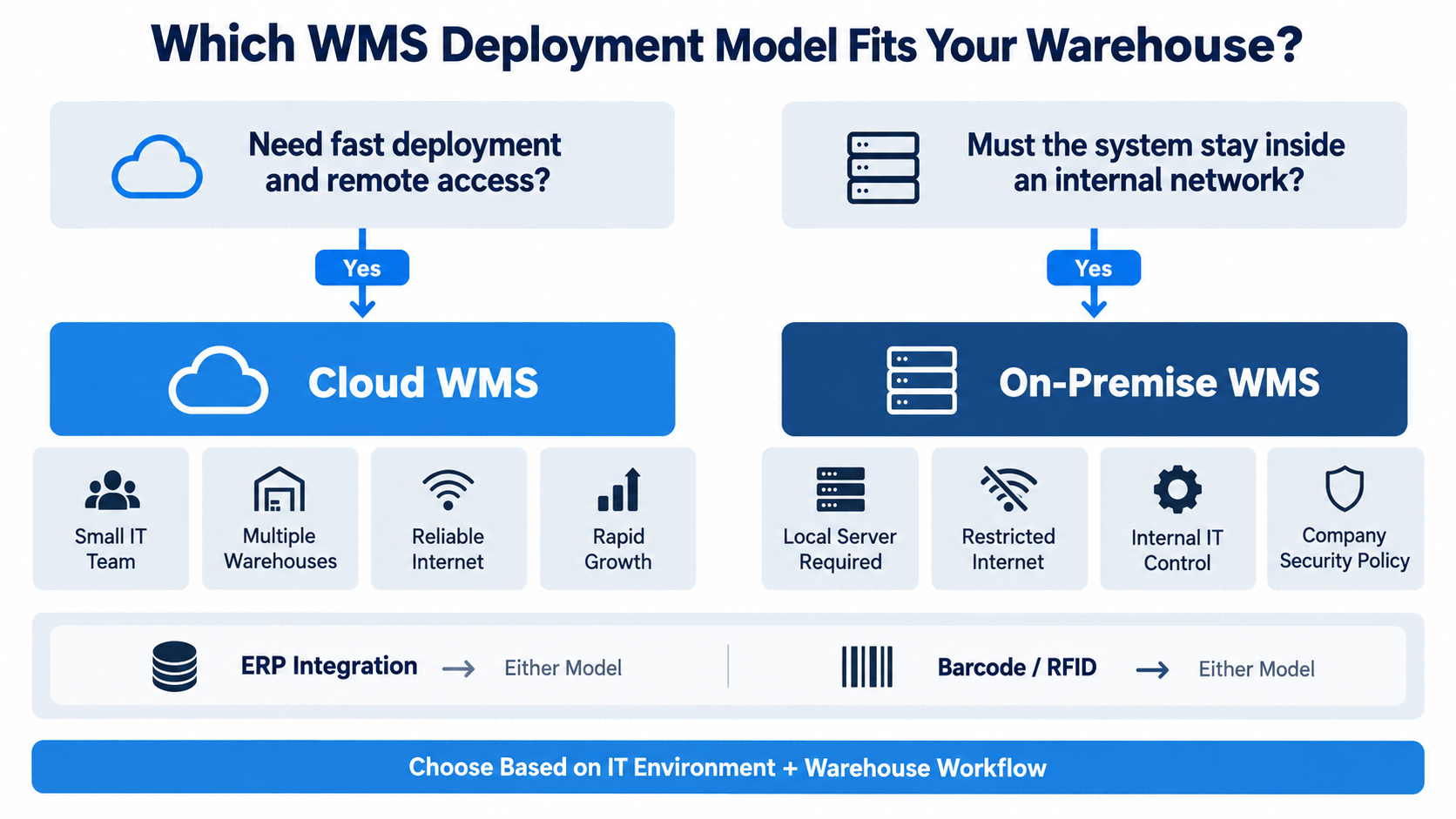
Elija Cloud WMS cuando:
Elija WMS local cuando:
Si ambos modelos son técnicamente posibles, compare el costo total, la carga de trabajo de TI, la escalabilidad y las necesidades de integración futuras.
| Tu situación | Mejor punto de partida |
| Pequeño equipo de TI | WMS en la nube |
| Necesitamos un despliegue rápido. | WMS en la nube |
| Varias ubicaciones de almacenes | WMS en la nube |
| Se requiere acceso remoto | WMS en la nube |
| Se espera una rápida expansión | WMS en la nube |
| Solo para red interna | En las instalaciones |
| Se requiere un servidor local. | En las instalaciones |
| Internet externo restringido | En las instalaciones |
| La empresa controla la infraestructura de TI. | En las instalaciones puede encajar |
| Se requiere integración con el sistema ERP. | Cualquiera |
| Se requiere código de barras o RFID | Cualquiera |
| Internet es inestable Evaluar | Capacidad local o sin conexión |
Antes de decidir, pregúntese:
Si un proveedor no puede responder a estas preguntas con claridad, es probable que la arquitectura de implementación aún no esté completamente definida.
FYJ admite la implementación de la gestión de almacenes tanto en la nube como localmente.
La elección suele comenzar con algunas preguntas prácticas:
El modelo de despliegue se selecciona una vez que estos requisitos están claros.
En la práctica, no recomendamos la nube ni las soluciones locales simplemente porque una sea más reciente.
El sistema debe adaptarse tanto al flujo de trabajo del almacén como al entorno informático del cliente.
¿Es mejor un WMS en la nube que un WMS local?
No siempre. Los sistemas WMS en la nube suelen ser más fáciles de implementar y mantener. Las soluciones locales son más adecuadas cuando se requiere el control de la red interna o del servidor local.
¿Es más económico un sistema WMS en la nube?
Puede que reduzca el coste inicial de la infraestructura, pero el coste total seguirá dependiendo de las suscripciones, los usuarios, la integración, el hardware y el funcionamiento a largo plazo.
¿Cloud WMS requiere acceso a internet?
Normalmente sí. Pregunte si el sistema o la PDA admiten flujos de trabajo sin conexión cuando se interrumpe la conectividad.
¿Es más seguro un sistema WMS local?
No automáticamente. Si bien le brinda al cliente un control más directo sobre el entorno local, la seguridad real depende del diseño del sistema, el control de acceso, el mantenimiento y la administración de TI.
¿Ambos modelos pueden integrarse con el sistema ERP?
Sí, si se dispone de API o métodos de integración adecuados.
¿Pueden los sistemas WMS en la nube y locales ser compatibles con códigos de barras y RFID?
Sí. Los códigos de barras y la tecnología RFID son tecnologías de recopilación de datos y pueden utilizarse con cualquiera de los dos modelos de implementación, siempre que el software lo admita.
Tanto los sistemas WMS en la nube como los sistemas WMS locales pueden respaldar eficazmente las operaciones de almacén.
Para muchos almacenes en crecimiento, la solución Cloud WMS es más fácil de implementar y escalar.
Para las organizaciones con redes internas controladas o requisitos estrictos de infraestructura local, la instalación en las instalaciones del cliente puede ser la opción más práctica.
La pregunta clave no es:
¿Qué modelo es mejor?
Es:
¿Qué modelo se ajusta mejor a nuestro entorno informático, al flujo de trabajo de nuestro almacén y a nuestro crecimiento futuro?
Esa es la decisión que debería guiar el proyecto WMS.
Hi! Click one of our members below to chat on
 es
es 


 Red IPv6 compatible